
Productivity app thatthinks with you.
Whether you're a freelancer, work solo, or lead a team — one place to run it all.
Be the first to react to the live demo
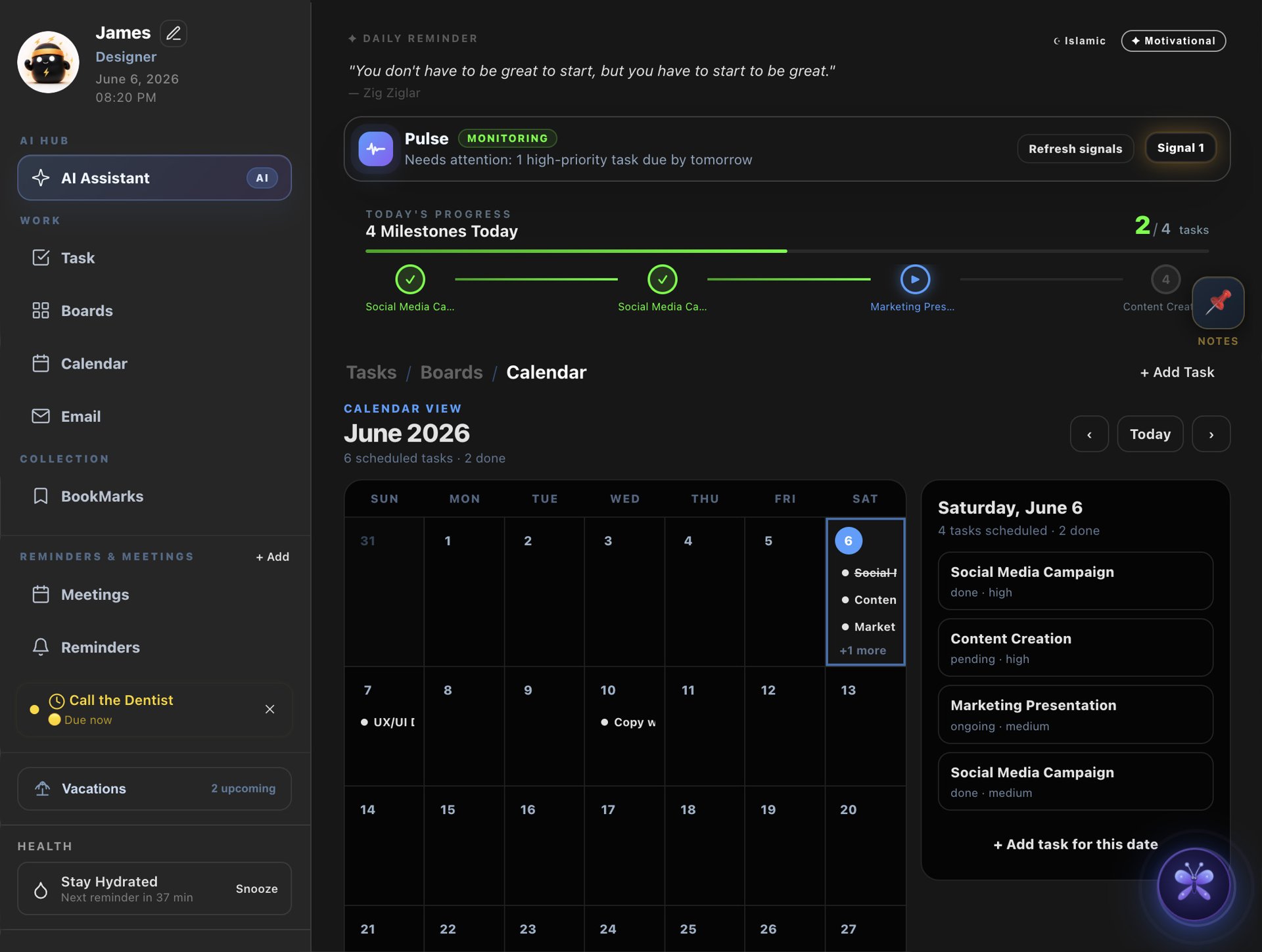
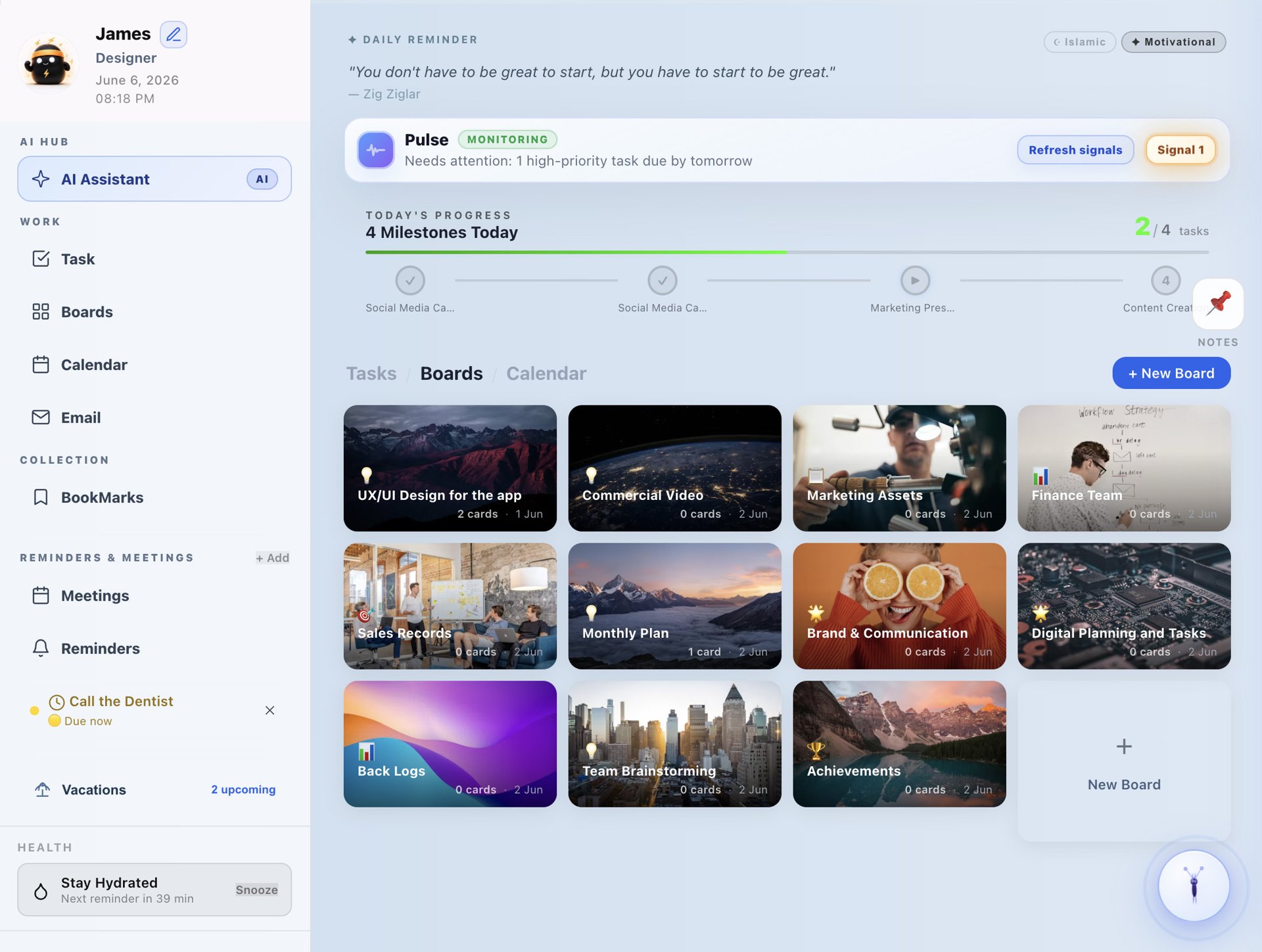
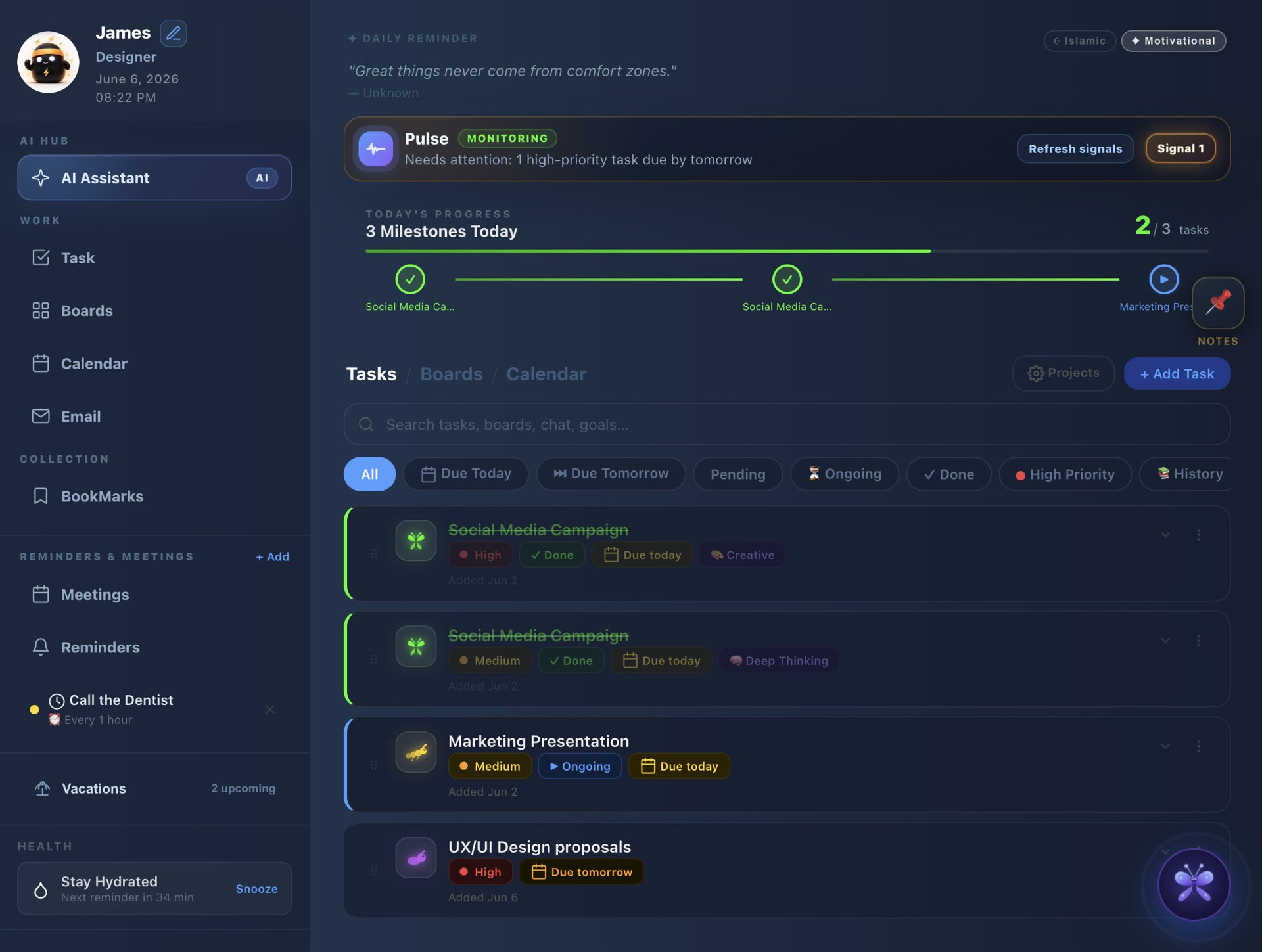
See how BloomBoard compares.
BloomBoard vs Notion, Trello, ClickUp, Asana and Monday.com.
| Features |  BloomBoard BloomBoard | Notion | Trello | ClickUp | Asana | Monday |
|---|---|---|---|---|---|---|
| Platform | ||||||
| Works fully offline | Always | Limited | View only | View only | ||
| Data location | Your Mac (free)Cloud (paid) | Cloud only | Cloud only | Cloud only | Cloud only | Cloud only |
| Account required | Free = nonePaid = account | Always | Always | Always | Always | Always |
| Tasks & Projects | ||||||
| Task management | ||||||
| Subtasks & file attachments | ||||||
| Project boards (kanban) | ||||||
| KPI tracking + PDF reports | ||||||
| Daily milestone tracker | ||||||
| Streak & badge rewards | ||||||
| Team & Collaboration | ||||||
| Voice & video callsNew | Built-in | Via add-on | Via add-on | Via add-on | Via add-on | |
| Team collaboration | ||||||
| Built-in team chat | ||||||
| Voice messages in boards | ||||||
| Meetings + 5-min alerts | ||||||
| Wellbeing & Personal | ||||||
| Mood tracking per task | ||||||
| Health & hydration tracker | ||||||
| Mood avatars | ||||||
| Sticky notes | ||||||
| AI Features | ||||||
| AI assistant built-in | Included | Paid add-on | Paid add-on | Paid add-on | Paid add-on | |
| AI email writer | ||||||
| AI meeting notes → tasks | Paid | |||||
| AI plan my day | ||||||
| AI Chief of Staff (Pulse) | ||||||
| Pricing | ||||||
| Free plan | Trial only |
One app. Everything you need.
Tasks, boards, team chat and calls, KPIs, reminders and an AI assistant — in one window on your Mac.
What people say
I've tried every productivity app on the market. BloomBoard is the first one that actually stuck — everything I need is in one window.
Alex T.
Product Manager, Berlin
The KPI dashboard and streak tracking completely changed how I start my mornings. I actually look forward to opening my Mac.
Mia L.
Startup Founder, Singapore
No cloud, no account, no tracking — and it's still the most capable dashboard I've used. The privacy-first approach is exactly what I needed.
Noah B.
Security Engineer, Zurich
Our team uses it individually and syncs daily in standups. The hydration and mood tracking sounds small but genuinely improves how we work together.
Rachel & Dan
Co-founders, Buildtide
Replaced my sticky notes, Notion, and two habit apps. Everything in one glassy window — it just feels premium every single time I open it.
Kenji S.
Designer, Tokyo
We onboarded our remote team in minutes. Each person tracks their own KPIs locally — no data leaves their machine. IT loves us for it.
Fatima & Co.
Operations Lead, Amsterdam
Which plan is right for you?
Answer two quick questions and we'll point you to the right one.
Question 1 of 2
How do you use your Mac day-to-day?
Free plan forever
No card required to start
Your data never leaves
100% local, zero cloud tracking
Cancel any time
No lock-in, no questions asked
AI assistant included
Plans your day with you
Start free. Upgrade when ready.
Every plan includes the core app. Flow and Bloom add AI and reports, Team adds your people.
Free
Try BloomBoard on your own, for as long as you like.
Download free
macOS 11+ · Apple Silicon & Intel
Tasks & Planning
- Up to 7 tasks
- Basic task management
- Due date & priority tracking
- Reminders & Meetings
- Boards - 5 boards
- Bloom AI Task Automation
Goals & KPIs
- Goals & KPIs tracking
- Work Summary & KPI Evaluation
- Detailed KPI AI evaluation
- PDF report export
AI Assistant Hub
- Bloom AI Coworker
- Email & Messages (5 / month)
- Meeting Notes → Tasks (5 / month)
- AI Chief of Staff (3 critical-attention signals)
- Daily Recap (last 1 day)
- Workload Health
- I am Stuck
- Plan My Day · on Bloom
Team
- Team members reports and progress
Support & Extras
- Priority support
- Early access to new features
Flow
Most popularFor focused individuals who want AI help every day.
Billed $72 / year
Start 7-day trial7-day free trial · cancel anytime
Tasks & Planning
- Unlimited tasks
- Basic task management
- Due date & priority tracking
- Reminders & Meetings
- Boards - 10 boards
- Bloom AI Task Automation
Goals & KPIs
- Goals & KPIs tracking · on Bloom
- Work Summary & KPI Evaluation · on Bloom
- Detailed KPI AI evaluation
- PDF report export
AI Assistant Hub
- Bloom AI Coworker (50 tasks / month)Ask anything, create tasks, automation, write emails and more
- Email & Messages (50 / month)Grammar fix, rewrite emails, professional, formal, friendly
- Meeting Notes → Tasks (20 / month)
- AI Chief of Staff (10 critical-attention signals)24/7 Watch, risk Alerts, live Intelligence, critical Signals, pulse AI
- Daily Recap (last 30 days)Daily, 30 days, copy to chat
- Workload Health · on Team
- I am Stuck (20 / month)AI Support, aI Planning, smart Plan
- Plan My Day · on Bloom
Team
- Team members reports and progress · on Team
Support & Extras
- Priority support
- Early access to new features
Bloom
Best valueEverything unlocked, with unlimited AI and KPI reports.
Billed $156 / year
Start 7-day trial7-day free trial · cancel anytime
Tasks & Planning
- Unlimited tasks
- Basic task management
- Due date & priority tracking
- Reminders & Meetings
- Boards - Unlimited
- Bloom AI Task Automation
Goals & KPIs
- Goals & KPIs tracking
- Work Summary & KPI Evaluation
- Detailed KPI AI evaluation
- PDF report export
AI Assistant Hub
- AI Assistance (Unlimited)
- Bloom AI Coworker (Unlimited)Ask anything, create tasks, automation, write emails and more
- Email & Messages (Unlimited)Grammar fix, rewrite emails, professional, formal, friendly
- Meeting Notes → Tasks (Unlimited)
- AI Chief of Staff (unlimited critical-attention signals)24/7 Watch, risk Alerts, live Intelligence, critical Signals, pulse AI
- Daily Recap (last 180 days)Daily, 180 days, copy to chat
- Workload Health · on Team
- I am Stuck (Unlimited)AI Support, aI Planning, smart Plan
- Plan My Day
Team
- Team members reports and progress · on Team
Support & Extras
- Priority support
- Early access to new features
Team
For teamsFor teams of three or more working in one place.
Billed $144 / user / year
Volume pricing
3-seat minimum · cancel anytime
Tasks & Planning
- Unlimited tasks
- Task assignment by managers
- Shared project workspaces
- Reminders & Meetings
- Boards - Unlimited
- Bloom AI Task Automation
Goals & KPIs
- Team KPI tracking
- Team performance reports
- Shared PDF report exports
- KPI leaderboard
AI Assistant Hub
- Unlimited AI generations
- Bloom AI CoworkerAsk anything, create tasks, automation, write emails and more
- Email & MessagesGrammar fix, rewrite emails, professional, formal, friendly
- Meeting Notes → Tasks
- AI Chief of Staff (unlimited critical-attention signals)24/7 Watch, risk Alerts, live Intelligence, critical Signals, pulse AI
- Daily Recap (last 180 days)Daily, 180 days, copy to chat
- Workload Health with private manager signals
- I am StuckAI Support, aI Planning, smart Plan
- Plan My Day
Team
- Team members reports and progress
- Voice messages in board comments
- Team chat for every workspace
- Group-based team conversations
- Member tagging in cards and comments
Support & Extras
- Admin dashboard & controls
- Real-time task sync
- In-task comments & feedback
- Up to 50 seats
- Custom plans for enterprises and large organizations
All paid plans include a 7-day free trial. No credit card required to start. Cancel anytime.
Up and running in minutes.
Four steps from download to a fully activated workspace.
- 1
Install the app
Download BloomBoard for Mac. It's free, and you can use it right away.
- 2
Pick a plan
Choose a plan above to start your free trial or buy straight away.
- 3
Copy your license key
Open the Access Purchase email and go to your customer portal. Your key is there.
- 4
Activate
In the app, open Settings, paste the key and activate this Mac.
Frequently asked questions
Clear answers about BloomBoard, pricing, privacy, AI, teams, and how the dashboard fits into your daily workflow.
What is BloomBoard?
BloomBoard is a macOS productivity app that brings tasks, reminders, milestones, streaks, hydration, boards, KPIs, reports, and AI planning into one focused dashboard.
Is BloomBoard free to start?
Yes. The Free plan is available forever and includes the core task workflow, reminders, meetings, and limited boards so you can try the app before upgrading.
Does BloomBoard work offline?
BloomBoard is designed as a local-first desktop app. Your everyday workflow is built around fast access on your Mac without requiring a browser tab or cloud account.
Is the dashboard customizable?
Yes. You can customize the dashboard around the way you work, including boards, projects, priorities, reminders, task details, health tracking, and the views you rely on most.
What do Flow and Bloom unlock?
Flow adds more power for daily work, including unlimited tasks, boards, AI task automation, email and message tools, meeting notes, and PDF report export. Bloom expands the app with unlimited AI generations, KPI tools, advanced planning, and priority features.
Can teams use BloomBoard together?
Yes. The Team plan is built for managers and members who need shared boards, task assignment, member progress, reports, notifications, comments, and team performance tracking.
Can BloomBoard create reports?
Yes. Paid plans include PDF report export, and Bloom adds deeper KPI tracking and work summary evaluation for people who need a clearer performance view.
What can the AI features do?
Bloom AI can help write emails and messages, turn meeting notes into tasks, plan your day, automate tasks, and support you when you are stuck or need a clearer next step.
Which devices are supported?
BloomBoard is designed for macOS 11 and later, including Apple Silicon and Intel Macs.
Take control of your day.
Free to start. No cloud. No account. Local-first and beautifully designed for macOS.
Requires macOS 11+. Apple Silicon & Intel. Free plan available forever.
No account · No cloud · No tracking · Free to start